8
High
Product Page
Size availability not shown
Product pages do not display size availability upfront, forcing users to click through to select a size and potentially discover their size is unavailable, causing friction and potential abandonment.
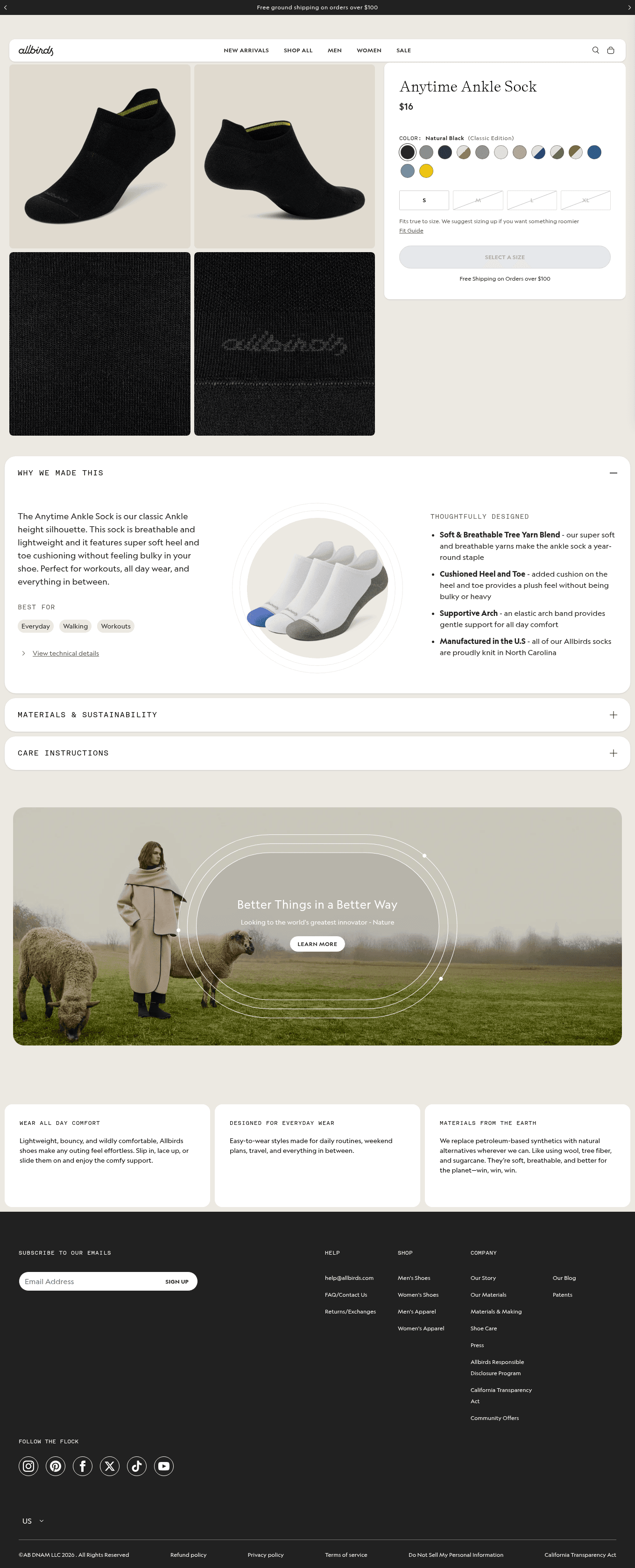
scroll ↕ — this is the live page
⚠ Size availability not shownProduct pages do not display size availability upfront, forcing users to click through to select a size and potentially discover their size is …
Fix
Evidence
Observed on the live site
✓ Flagged independently by 1 of 7 analysts
- On the Anytime Ankle Sock product page, the CTA is 'Get Notified' instead of 'Add to Cart', indicating the product is out of stock, but the page does not show which sizes are unavailable until the user interacts with the size selector. The shop-all page includes a size filter, but individual product pages do not list available sizes in the main content.
Business case
If this change wins
$35,381 – $176,904
annual opportunity if it wins
Medium
Effort — 2-5 days
not testable at current traffic
A/B test duration
Prioritisation
PXL score: 4 / 10
| Question | Answer | Points |
|---|---|---|
| Is the change above the fold? | No | 0 |
| Is the change noticeable in under 5 seconds? | Yes | 2 |
| Does it add or remove an element? | Yes | 1 |
| Does it run on a high-traffic page? | Yes | 1 |
| Discovered via user testing? | No | 0 |
| Discovered via qualitative feedback (survey, support)? | No | 0 |
| Supported by heatmaps or session recordings? | No | 0 |
| Found via digital analytics or real-user field data? | No | 0 |
| Verified by direct technical measurement? | No | 0 |
Implementation
Hand this to your developer
- Surface
- Product Page — PRODUCT PAGE | PRICING PAGE
- Problem
- Product pages do not display size availability upfront, forcing users to click through to select a size and potentially discover their size is unavailable, causing friction and potential abandonment.
- Current state
- h1: Anytime Ankle Sock; cta: Get Notified; notes: No size availability shown on the product page; users must click to see sizes and may find their size is not available.
- Change
- h1: Anytime Ankle Sock; cta: Add to Cart; notes: Display available sizes and stock status directly on the product page, e.g., 'Sizes: S, M, L' or 'Out of stock' to reduce friction.
- Acceptance criteria
- GIVEN a first-time visitor on the affected page
WHEN the change is live
THEN Display available sizes and stock status directly on the product page, e.g., 'Sizes: S, M, L' or 'Out of stock' to reduce friction, with no regression at 375px and 1280px widths. - Tracking
- event: cro_size_availability_not_shown on interaction with the changed element; verify it fires in BOTH variants before opening traffic.
- Success metric
- conversion rate on the affected step
- QA checklist
- Chrome / Safari / Firefox · 375px + 1280px · keyboard reachable · screen-reader name present · no CLS introduced
- Effort
- Medium — 2-5 days
- Test plan
- 299,882 visitors per variant (95% significance, 80% power); not testable at current traffic.
- Rollback
- Feature-flag the change; revert the flag if the primary metric drops for 3 consecutive days.